
test-cloud
latest
false
Test Cloud 管理员指南
- 入门指南
- 数据安全性与合规性
- 组织
- 身份验证和安全性
- 许可
- 租户和服务
- 帐户和角色
- Ai Trust Layer
- 外部应用程序
- 通知
- 日志记录
- 数据导出
- 在您的组织中进行测试
- 故障排除
- 迁移到 Test Cloud
重要 :
新发布内容的本地化可能需要 1-2 周的时间才能完成。
配置防火墙
Test Cloud 服务在出站访问受限的网络环境中运行所需的域名和 IP 范围。
此页面列出了云平台和关联的 UiPath 服务必须允许的域 (FQDN) 和 IP 范围 (CIDR),以便在网络访问仅限于已批准目标的环境中正常运行。
视您的组织管理出站和入站流量的方式而定,这些允许列表可应用于防火墙或其他负责管控外部连接的网络安全层。
备注:
术语更新 — 2026 年 7 月 31 日
我们在本页面中将“出站 IP 范围”重命名为IP 范围。“出站”描述了 UiPath 端的连接,而不是您的连接 — 这些范围是 UiPath 的连接来源,但从您的防火墙的角度来看,此流量为入站流量。从您的角度来看,域/FQDN 仍然是出站端。有关完整区别,请参阅下方的“概述”部分。
概述
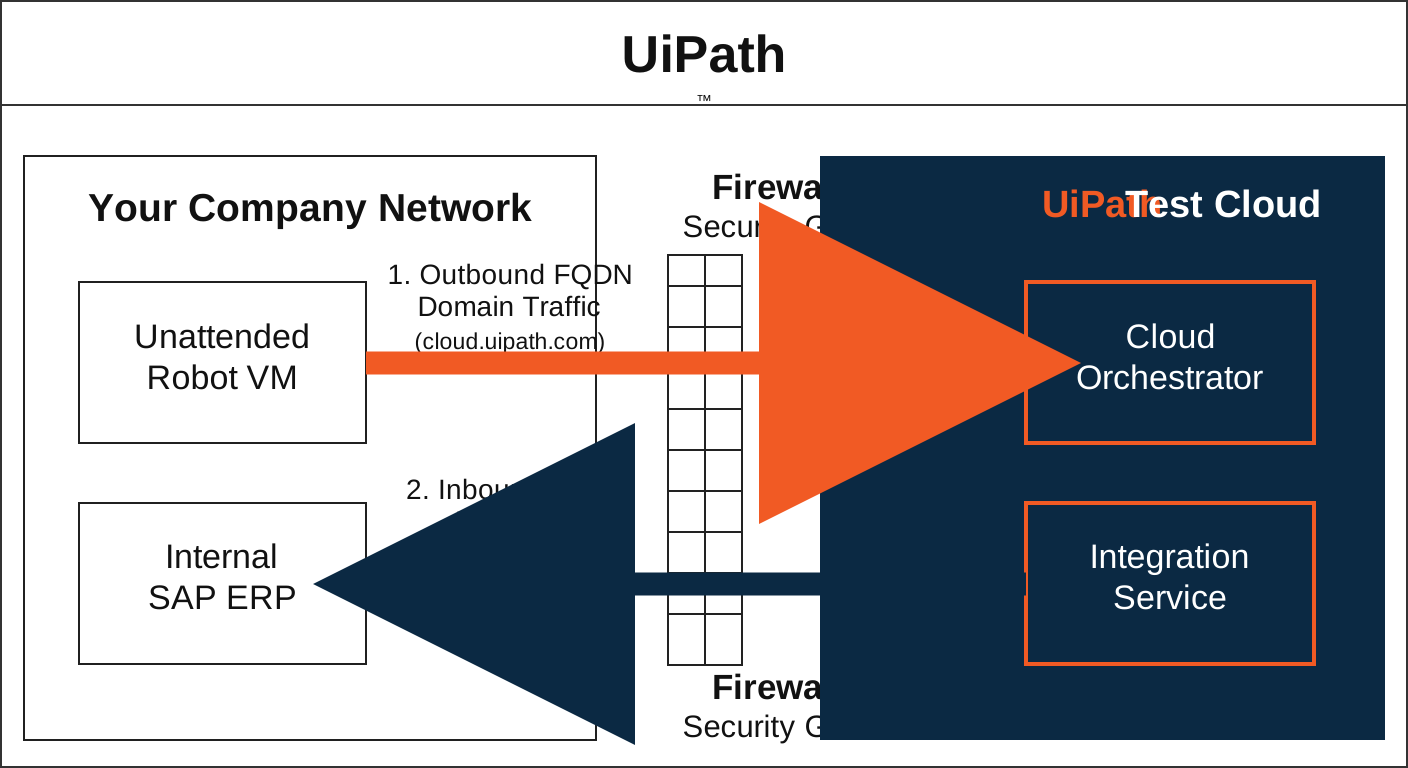
UiPath 服务需要两种类型的允许列表,具体取决于发起连接的用户:
- DNS 域允许列表 (FQDN) :在用户、机器人或本地部署组件连接到 UiPath 时应用。示例包括登录 Automation Cloud Portal、Orchestrator 或 Test Manager,或访问任何 UiPath 界面。在这些情况下,您的环境是请求者,因此此流量为您网络的出站流量 — 将这些域添加到防火墙的出站允许列表中。这些域名必须始终列在 FQDN 允许列表中(在本页中称为“域名”),因为其底层基础架构是分布式的。
- IP 范围 (CIDR) :在 UiPath 连接到您的系统时应用。示例包括云门户访问 Azure 密钥保险库以获取客户管理的密钥、与 Microsoft Exchange 同步的 IXP、连接到 SAP 的 Test Manager 或调用您的端点的 Integration Service 和 Apps。在这些场景中,UiPath 是请求者,因此从防火墙的角度来看,此流量为入站流量 — 将相应的 CIDR 块添加到入站允许列表中。
如何使用此部分
为确保不中断访问 UiPath 服务:
- 导航到您所使用的云平台:Test Cloud、Test Cloud 公共部门版或 Test Cloud 专用版。
- 识别租户中使用的 UiPath 服务。
- 对于每项服务:
- 使用上述所有域配置域允许列表。
- 使用 UiPath 连接到系统的 IP 范围配置防火墙的入站允许列表。
备注:
指定后,请使用与租户区域和组织区域对应的 IP 范围。某些 UiPath 服务功能继承组织的区域,而不继承租户的区域。如果不同,将两者的 IP 范围列入白名单。有关组织级别和租户级别服务的更多信息,请参阅全局云区域。如果您的租户或组织迁移到其他区域,请相应地更新您的 IP 范围。
以下部分提供了 UiPath 服务应允许的所需域名和 IP 范围。