
- 发行说明
- 入门指南
- 安装
- 配置
- 集成
- 身份验证
- Working with Apps and Discovery Accelerators
- AppOne 菜单和仪表板
- AppOne 设置
- TemplateOne 1.0.0 菜单和仪表板
- TemplateOne 1.0.0 设置
- TemplateOne menus and dashboards
- TemplateOne 2021.4.0 设置
- Purchase to Pay Discovery Accelerator 菜单和仪表板
- 购买到付款 Discovery Accelerator 设置
- Order to cash Discovery Accelerator 菜单和仪表板
- “订单到现金” Discovery Accelerator 设置
- Basic Connector for AppOne
- SAP Connectors
- 适用于 AppOne 的 SAP 订单到现金连接器
- 适用于 AppOne 的 SAP 采购到付款连接器
- SAP Connector for Purchase to Pay Discovery Accelerator
- SAP Connector for Order-to-Cash Discovery Accelerator
- Superadmin
- 仪表板和图表
- 表格和表格项目
- 应用程序完整性
- How to ....
- 使用 SQL 连接器
- Introduction to SQL connectors
- Setting up a SQL connector
- CData Sync extractions
- Running a SQL connector
- Editing transformations
- 释放 SQL 连接器
- Scheduling data extraction
- Structure of transformations
- Using SQL connectors for released apps
- Generating a cache with scripts
- Setting up a local test environment
- Separate development and production environments
- 实用资源
Process Mining 用户指南
简介
The Timing – Due dates dashboard displays information regarding cases meeting or not meeting deadlines and the related costs. Due dates can be predefined to set a significant stage or activity deadline in processes. The Timing – Due dates dashboard can be used to analyze various aspects of due dates in the processes. Using this dashboard, predefined due dates in the process can be examined, such as a payment deadline or an SLA that needs to be met on time.
The Timing - Due dates dashboard will only be visible if the dataset contains due dates.
On time
A due date can be subdivided in various groups or Time bins of lateness. Using the Timing - Due dates dashboard, it is visible how many due dates fall in which category. If a process has multiple due dates related to it, they can all be added to the analysis, but the dashboard will show only one of the due dates at a time. See illustration below.
成本和逾期天数
Due dates can have amounts associated with them, for example, a discount for timely payment or a fine for late delivery. These amounts can be analyzed using the Timing - Due dates dashboard as well. See illustration below.
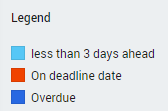
到期日期图例
筛选器面板中的图例解释了分析中颜色的含义。
请参见下图。
历史
按案例类型显示按时付款和逾期付款的发票历史记录以及所涉及的成本。
请参见下图。