
- Release notes
- Getting started
- Installation
- Configuration
- Integrations
- Authentication
- Working with Apps and Discovery Accelerators
- AppOne menus and dashboards
- AppOne setup
- TemplateOne 1.0.0 menus and dashboards
- TemplateOne 1.0.0 setup
- TemplateOne menus and dashboards
- TemplateOne 2021.4.0 setup
- Purchase to Pay Discovery Accelerator menus and dashboards
- Purchase to Pay Discovery Accelerator Setup
- Order to Cash Discovery Accelerator menus and dashboards
- Order to Cash Discovery Accelerator Setup
- Basic Connector for AppOne
- SAP Connectors
- Introduction to SAP Connector
- SAP input
- Checking the data in the SAP Connector
- Adding process specific tags to the SAP Connector for AppOne
- Adding process specific Due dates to the SAP Connector for AppOne
- Adding automation estimates to the SAP Connector for AppOne
- Adding attributes to the SAP Connector for AppOne
- Adding activities to the SAP Connector for AppOne
- Adding entities to the SAP Connector for AppOne
- SAP Order to Cash Connector for AppOne
- SAP Purchase to Pay Connector for AppOne
- SAP Connector for Purchase to Pay Discovery Accelerator
- SAP Connector for Order-to-Cash Discovery Accelerator
- Superadmin
- Dashboards and charts
- Tables and table items
- Application integrity
- How to ....
- Working with SQL connectors
- Introduction to SQL connectors
- Setting up a SQL connector
- CData Sync extractions
- Running a SQL connector
- Editing transformations
- Releasing a SQL Connector
- Scheduling data extraction
- Structure of transformations
- Using SQL connectors for released apps
- Generating a cache with scripts
- Setting up a local test environment
- Separate development and production environments
- Useful resources
Timing - Due Dates
Timing - Due Dates dashboard in Process Mining standalone, used to analyze cases meeting or missing deadlines and the associated costs for predefined process milestones.
Introduction
The Timing – Due dates dashboard displays information regarding cases meeting or not meeting deadlines and the related costs. Due dates can be predefined to set a significant stage or activity deadline in processes. The Timing – Due dates dashboard can be used to analyze various aspects of due dates in the processes. Using this dashboard, predefined due dates in the process can be examined, such as a payment deadline or an SLA that needs to be met on time.
The Timing - Due dates dashboard will only be visible if the dataset contains due dates.
On time
A due date can be subdivided in various groups or Time bins of lateness. Using the Timing - Due dates dashboard, it is visible how many due dates fall in which category. If a process has multiple due dates related to it, they can all be added to the analysis, but the dashboard will show only one of the due dates at a time. See illustration below.
Costs and days overdue
Due dates can have amounts associated with them, for example, a discount for timely payment or a fine for late delivery. These amounts can be analyzed using the Timing - Due dates dashboard as well. See illustration below.
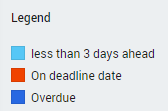
Due Dates legend
A legend in the filter panel explains the meaning of the colors in the analysis.
See illustration below.
History
The history of payment of invoices on time and late and the costs involved are shown per case type.
See illustration below.