
- 入门指南
- 最佳实践
- 租户
- Cloud Robots
- Cloud robots overview
- 为 Cloud robot 配置 VPN
- 配置 ExpressRoute 连接
- 实时流和远程控制
- Automation Suite 机器人
- 文件夹上下文
- 流程
- 作业
- Apps
- 触发器
- 日志
- 监控
- 索引
- 队列
- 资产
- 连接
- 业务规则
- 存储桶
- MCP 服务器
- Orchestrator 测试
- 资源目录服务
- 集成
- 故障排除


Orchestrator 用户指南
配置 ExpressRoute 连接
创建 ExpressRoute VPN 网关
要创建 ExpressRoute VPN 网关:
- 转到“管理员”。
- From the Tenants panel on the left side, select the tenant for which you want to create an ExpressRoute VPN gateway.
- Select the Gateway tile, then select Create gateway. The Create gateway panel opens.
- 为以下字段提供值:
选项 描述 网关类型 *
选择用于与云网络建立安全专用连接的方法。您有两个选项:
-
VPN —Select this option to create an encrypted connection over the public internet.
-
ExpressRoute —Select this option to establish an Azure network connection that bypasses the public internet entirely.
名称 *
为您网关命名。
网关 Vnet 的地址空间 *
为云网关网络指定唯一的专用 IP 范围。此范围必须与您当前的本地网络以及您计划用于 Cloud Robot 的任何未来 IP 范围不同。
-
If your automations rely on internal DNS names, you need to specify the IP addresses of your on-premises DNS servers. Select Add DNS Address (Optional), then provide the IP address of your on-premises DNS servers.
You can enter multiple DNS server IPs for redundancy, but each must resolve all DNS names your automations use. These servers are not used sequentially. If a server fails to resolve a necessary name, the automation fails.
-
Select Create. The setup may take up to one hour.
创建与本地设备的 ExpressRoute 连接
With the ExpressRoute gateway deployed, you can now connect your on-premises networks to it. Creating this connection differs from a standard setup because you are configuring how to use your pre-existing ExpressRoute circuit**—**the dedicated, private connection you have already established with Microsoft Azure. This process involves integrating your UiPath Gateway, or another Microsoft Azure resource, into that existing ExpressRoute infrastructure.
网关卡显示公共 IP 地址,这是隧道连接的基本信息。
-
To start the connection creation, select Add connection.
-
为以下字段提供值:
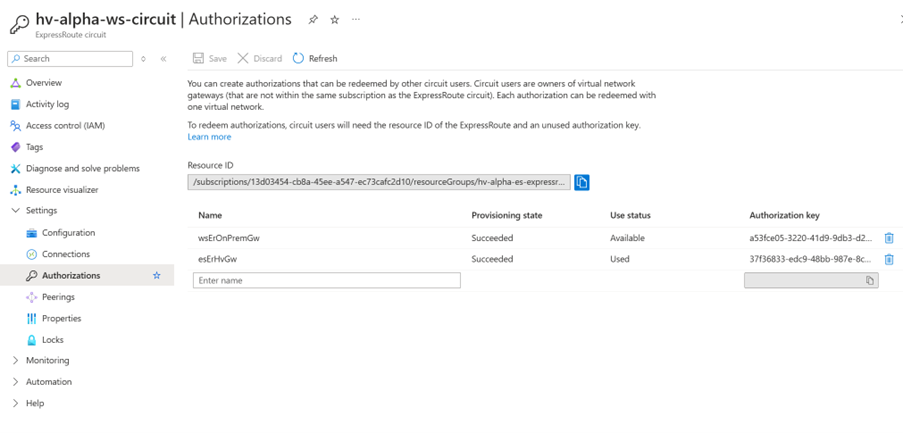
Figure 1. ExpressRoute circuit in Azure
选项 描述 连接名称 *
为您的连接命名。
授权密钥 *
要连接到线路,请先在 Azure 门户的 ExpressRoute 线路对象中生成授权钥。然后,在此字段中写入该密钥。
要授权连接:
-
转到 Azure 门户中的 ExpressRoute 线路。
-
创建授权密钥。
-
将生成的密钥粘贴到此字段。
资源 ID *
在 Azure 门户中找到 ExpressRoute 线路的资源 ID。将此 ID 复制并粘贴到以下字段。
-
-
选择“添加连接” 。配置完成后,连接状态可能需要一些时间才能更新为已连接。
On the Connections list, the Address Space and Public IP Address fields are empty and do not apply to the ExpressRoute connection. Unlike VPNs, ExpressRoute uses Border Gateway Protocol (BGP) for routing by default.
-