
- Getting started
- Data security and compliance
- Organizations
- Authentication and security
- Licensing
- About licensing
- Unified Pricing: Licensing plan framework
- Activating your Enterprise license
- Migrate from Test Suite to Test Cloud
- License migration
- Assigning licenses to tenants
- Assigning user licenses
- Deallocating user licenses
- Monitoring license allocation
- License overallocation
- Licensing notifications
- User license management
- Tenants and services
- Accounts and roles
- AI Trust Layer
- External applications
- Notifications
- Logging
- Data Export
- Testing in your organization
- Troubleshooting
- Migrating to Test Cloud
Configuring the firewall
Domains and IP ranges required for Test Cloud services to function in network environments with restricted outbound access.
This page lists the domains (FQDNs) and IP ranges (CIDRs) that must be allowed for the cloud platform and associated UiPath services to function correctly in environments where network access is restricted to approved destinations.
Depending on how your organization manages outbound and inbound traffic, these allow lists may be applied in your firewall or in another network security layer that governs external connectivity.
Terminology update — July 31, 2026
We renamed "outbound IP ranges" to IP ranges throughout this page. "Outbound" described UiPath's side of the connection, not yours — these ranges are what UiPath connects from, but from your firewall's perspective this traffic is inbound. Domains/FQDNs remain the outbound side, from your perspective. See the Overview section below for the full distinction.
Overview
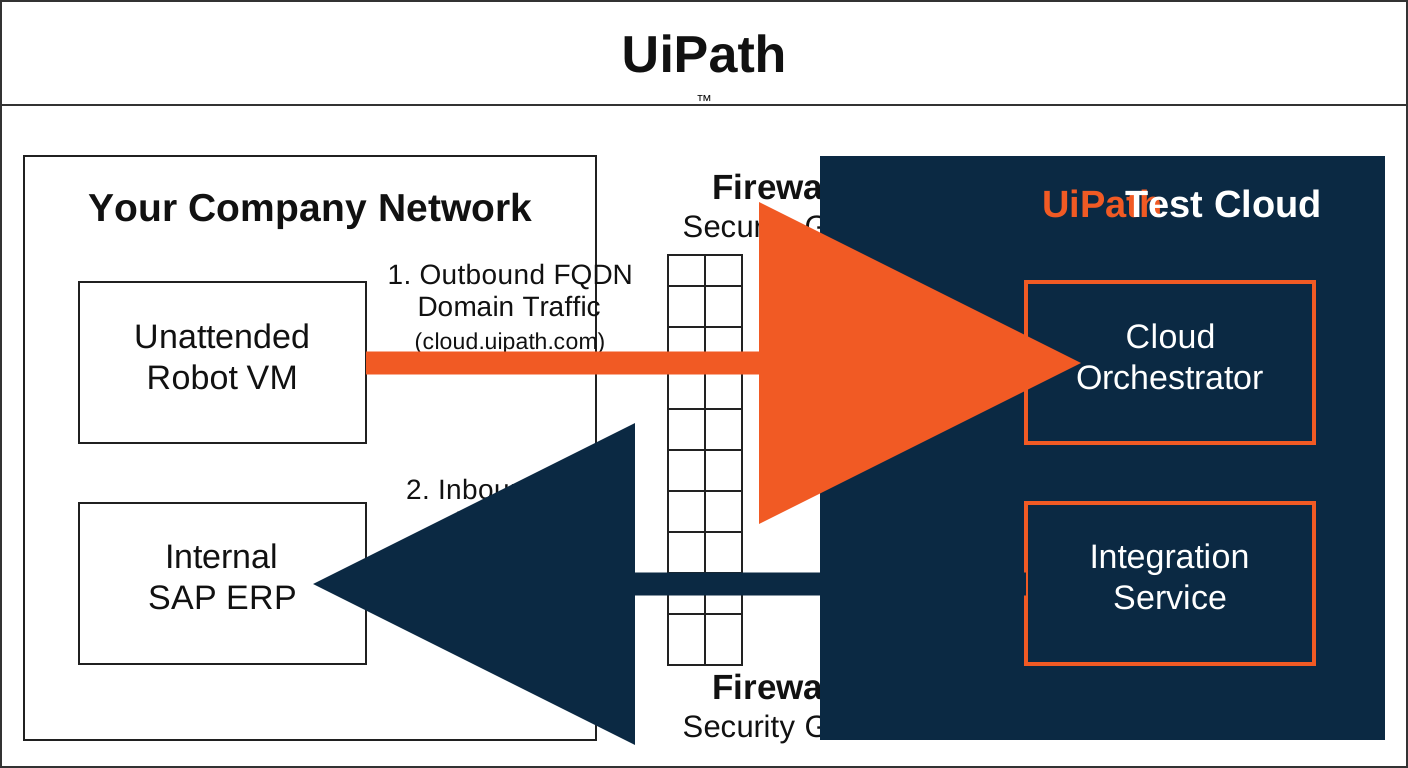
UiPath services require two types of allow lists, determined by who initiates the connection:
- DNS domain allowlist (FQDNs): Apply when users, robots, or on-premises components connect to UiPath. Examples include signing into Automation Cloud Portal, Orchestrator, or Test Manager, or accessing any UiPath interface. In these scenarios, your environment is the requester, so this traffic is outbound from your network — add these domains to your firewall's outbound allow list. These domains must always be allow listed by FQDN (referred to in this page as domains), because their underlying infrastructure is distributed.
- IP ranges (CIDRs): Apply when UiPath connects to your systems. Examples include cloud portal accessing your Azure Key Vault for Customer-Managed Keys, IXP syncing with Microsoft Exchange, Test Manager connecting to SAP, or Integration Service and Apps calling your endpoints. In these scenarios, UiPath is the requester, so from your firewall's perspective this traffic is inbound — add the corresponding CIDR blocks to your inbound allow list.
How to use this section
To ensure uninterrupted access to UiPath services:
- Navigate to the cloud platform that you use: Test Cloud, Test Cloud Public Sector, or Test Cloud Dedicated.
- Identify the UiPath services used in your tenant.
- For each service:
- Configure the domain allow list with all the mentioned domains.
- Configure your firewall's inbound allow list with the IP ranges where UiPath connects to your systems.
Note:
When specified, use the IP ranges that correspond to your tenant’s region and your organization’s region. Some UiPath service features inherit the organization’s region rather than the tenant’s region. If they differ, allowlist the IP ranges for both. For more information on organization-level and tenant-level services, see Global cloud regions. If your tenant or organization migrates to another region, update your IP ranges accordingly.
The following sections provide the required domains and IP ranges that should be allowed for UiPath services.