
- Before you begin
- Managing access
- Getting started
- Integrations
- Working with process apps
- Working with dashboards and charts
- Working with process graphs
- Working with Discover process models and Import BPMN models
- Showing or hiding the menu
- Context information
- Export
- Filters
- Sending automation ideas to UiPath® Automation Hub
- Tags
- Due dates
- Compare
- Conformance checking
- Process simulation
- Root cause analysis (Preview)
- Simulating automation potential
- Starting a Task Mining project from Process Mining
- Triggering an automation from a process app
- Viewing Process data
- Process Insights (preview)
- Creating apps
- Loading data
- Transforming data
- Autopilot™ for SQL (preview)
- Structure of transformations
- Tips for writing SQL
- Exporting and importing transformations
- Viewing the data run logs
- Merging event logs
- Configuring Tags
- Configuring Due dates
- Configuring fields for Automation potential
- Activity Configuration: Defining activity order
- Making the transformations available in dashboards
- Data models
- Adding and editing processes
- Customizing dashboards
- Publishing process apps
- App templates
- Notifications
- Additional resources


Process Mining user guide
Pivot table charts
Introduction
Pivot tables can be used to group data and to compare certain metrics. A pivot table shows the data in a tabular format and the fields are displayed as horizontal rows. The following illustration shows an example of a pivot table chart.
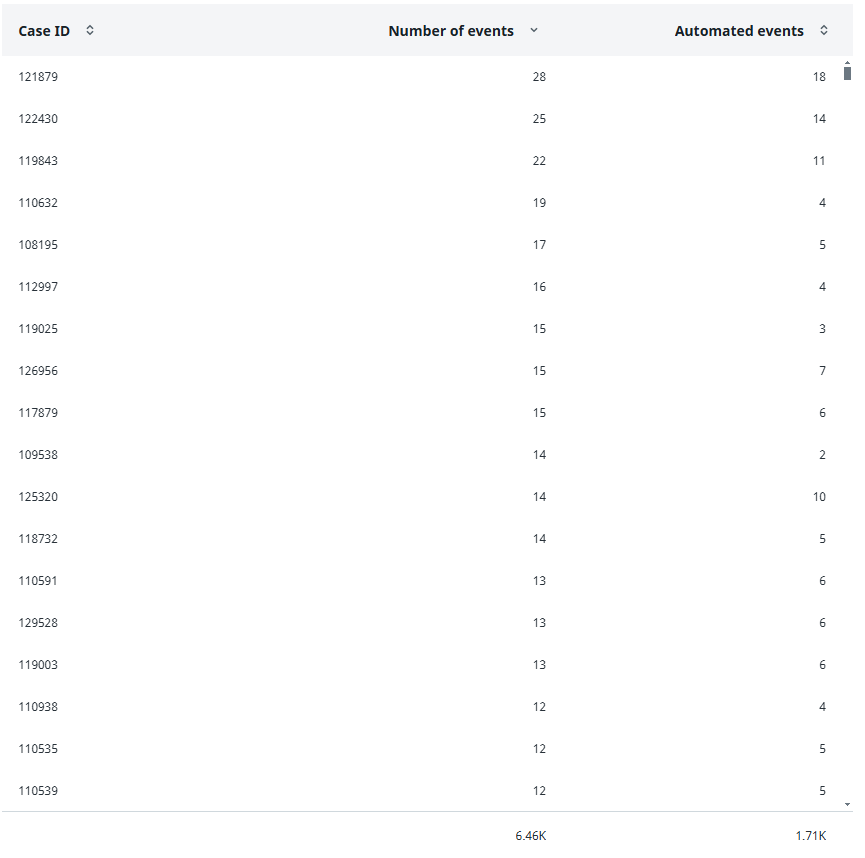
The total values for the metrics are displayed beneath the pivot table chart.
Properties
You can edit the properties of a pivot table chart in the Edit pivot table chart panel.
The following table describes the properties of the Pivot table chart.
| Element | Description |
|---|---|
| Title | Text box that enables you to edit the title of the pivot table chart. |
| Tooltip | Text box that enables you add a text that will be displayed as tooltip when the user hovers the mouse over the pivot table chart title in the published process app. |
| Fields | List of fields to be available for the pivot table chart.
Note: You must select at least one field for the pivot table chart. If you select multiple fields, the first field will be displayed by default. |
| Metrics | List of metrics to be available for the pivot table chart.
Note: You must at least select and enable one metric for the pivot table chart. If you select multiple metrics, the first metric will be displayed by default. |