
- Overview
- Quickstart
- Delegate
- Trust and compliance
- Governance
- Features
- Cartographer
- Cartographer overview
- The Cartographer interface
- Getting started with Cartographer
- Working with existing automations
- AS-IS (Current Process) documentation
- Providing documents to Cartographer
- Delegating a task
- TO-BE design and PDD generation
- Refining your PDD and the quality checklist
- Generating an SDD
- Sending SDDs to Automation Hub
- Delegate for Testing
- Reference
- Troubleshooting
- Backup and restore
Cartographer, Delegate's specialized profile for business analysts, which documents AS-IS and TO-BE business processes and generates a Process Design Document (PDD) for redesign or automation projects.
Cartographer is your discovery partner for turning process knowledge into build-ready blueprints:
- Documents the process as it runs today, as a confirmed AS-IS map
- Documents the redesigned process and generates a Process Design Document (PDD) for process redesign or automation projects
- Once the PDD is approved, generates a Solution Design Document (SDD) that development teams and coding agents use to build the automation
Cartographer's long-term goal is the Map of Work: a single, versioned, governed definition of how the business runs, so specifications, sign-off, and audit come from one source of truth instead of drifting documents. It draws together how the process actually runs, step by step, and the business rules that govern it — captured in the AS-IS and TO-BE maps you build with Cartographer.
Today, Cartographer has two core capabilities:
- Documenting a process — powered by a set of preset, predefined skills
- Designing an improved process — intelligently, taking into account business goals, pain points, the desired use of agents, and constraints
Both capabilities are based on skills and do not require additional applications. Documentation and Solutioning skills are further augmented with process-specific knowledge across 100+ well-researched articles in the process atlas.
Documenting a process usually means chasing down the people who know it, running interviews, and reconciling accounts that disagree with each other — all before you can even start drafting. Cartographer takes on that legwork directly:
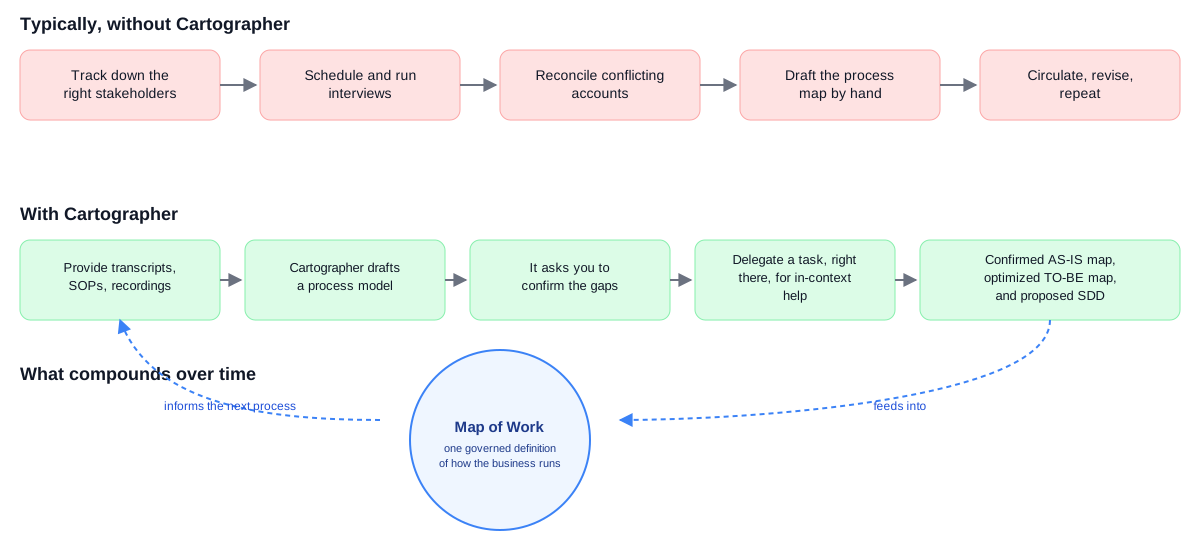
Switching to Cartographer
Cartographer sits in the same title bar switcher as Assistant and Delegate. Select Cartographer to move into it:
Work in Cartographer is organized into Business Processes — each one scoped to a single process, with its own name and a short description of what you are documenting, such as the AS-IS (Current Process) state, the TO-BE (Future Design) state, and the resulting Process Design Document (PDD).
Who this guide is for
This guide covers Cartographer's process-documentation capability and focuses on generating a Process Design Document for a process redesign, improvement, transformation, or a brand-new launch. It is written for business analysts, or anyone performing that function on a team, who need to collect available information, coordinate key design decisions, gain approvals, and move from a PDD to an SDD.
How it works
A business process tracks its own progress through a series of stages, visible in the Progress section of the sidebar:
| Stage | What happens |
|---|---|
| Discovery | You describe the process, or provide source material for it. |
| Define as-is | Cartographer builds a process model, extracts business rules, identifies gaps, and confirms a current-state process map. |
| Design to-be | You assign an automation mode to each step. Cartographer drafts a future-state map. |
| Validate to-be | You review and confirm the future-state design before the detailed documentation is written. |
| Architect process | Cartographer combines both states into a formatted, downloadable PDD. |
| Architect solution | From the approved PDD, Cartographer generates an SDD ready for development teams and coding agents. |
| Handoff | You publish the SDD and PDD to Automation Hub for the build team. |
What you produce
- A confirmed AS-IS process map, as an embedded flowchart
- A confirmed TO-BE process map, color-coded by automation mode
- A delivery model showing each step's current and future handling
- A downloadable PDD as a
.docxfile - A downloadable SDD as a Markdown file, ready for coding agents
Model choice matters. The LLM model you select affects how well Cartographer performs. All models are accessed exclusively through the UiPath AI Trust Layer. If you're on a different model than recommended, Cartographer shows a Model not recommended banner — a quality heads-up, not an error. See Cartographer recommended models to change it.
Next steps
Continue to Getting started with Cartographer to prepare for your first session.