
- 概述
- 入门指南
- Activities (活动)
- Insights 仪表板
- Document Understanding 流程
- 快速入门教程
- 框架组件
- 模型详细信息
- 概述
- Document Understanding - ML 包
- DocumentClassifier - ML 包
- 具有 OCR 功能的 ML 包
- 1040 - ML 包
- 1040 附表 C - ML 包
- 1040 附表 D - ML 包
- 1040 附表 E - ML 包
- 1040x - ML 包
- 3949a - ML 包
- 4506T - ML 包
- 709 - ML 包
- 941x - ML 包
- 9465 - ML 包
- ACORD125 - ML 包
- ACORD126 - ML 包
- ACORD131 - ML 包
- ACORD140 - ML 包
- ACORD25 - ML 包
- 银行对账单 - ML 包
- 提单 - ML 包
- 公司注册证书 - ML 包
- 原产地证书 - ML 包
- 检查 - ML 包
- 儿童产品证书 - ML 包
- CMS1500 - ML 包
- 欧盟符合性声明 - ML 包
- 财务报表 (Financial statements) - ML 包
- FM1003 - ML 包
- I9 - ML 包
- ID Cards - ML 包
- Invoices - ML 包
- InvoicesAustralia - ML 包
- 中国发票 - ML 包
- 希伯来语发票 - ML 包
- 印度发票 - ML 包
- 日本发票 - ML 包
- 装运发票 - ML 包
- 装箱单 - ML 包
- 工资单 - ML 包
- 护照 - ML 包
- 采购订单 - ML 包
- 收据 - ML 包
- 汇款通知书 - ML 包
- UB04 - ML 包
- 水电费账单 - ML 包
- 车辆所有权证明 - ML 包
- W2 - ML 包
- W9 - ML 包
- 其他开箱即用的 ML 包
- 公共端点
- 流量限制
- OCR 配置
- 管道
- OCR 服务
- 支持的语言
- 深度学习
- 数据与安全性
- 许可和计费逻辑


Document Understanding classic user guide
自动微调循环(公开预览)
在训练/再训练 ML 模型时,首先要牢记的是,通过将所有数据累积到单个大型且理想情况下精心策划的数据集中,可以获得最佳结果。在数据集 A 上进行训练,然后在数据集 B 上重新训练生成的模型,这样产生的结果将远不如在组合的数据集 A+B 上训练的结果。
第二点要牢记的是,并非所有数据都相同。与在具有不同焦点的工具(如“验证站点”)中标记的数据相比,在专用工具(如 Document Manager)中标记的数据通常质量更高,并且所生成的模型也更好。从业务流程的角度来看,来自“验证站点”的数据可能是高质量的,但从模型训练的角度来看,则不是如此,因为 ML 模型需要非常特定形式的数据,这几乎总是与业务流程所需的形式不同。例如,在一张 10 页的发票上,发票编号可能会出现在每一页上,但在“验证站点”中,只需在第一页上指出该编号,而在 Document Manager 中,您要在每一页上对其进行标记。在这种情况下,“验证站点”数据中会缺失 90% 的正确标记。因此,如上所述,“验证站点”数据实用性有限。
要有效训练 ML 模型,您需要一个全面、优质、有代表性的数据集。因此,一种累积方法是向输入数据集添加更多数据,从而每次都使用更大的数据集训练 ML 模型。实现此目的的一种方法是使用自动微调循环。
ML 模型的生命周期
在任何机器学习模型的生命周期中,都有两个主要阶段:
- “构建”阶段,以及
- “维护”阶段
构建阶段
在此第一阶段,您将使用 Document Manager 准备训练数据集和评估数据集,以便获得可能的最佳性能。
同时,您需要围绕 ML 模型构建 RPA 自动化和业务逻辑,这对于获取预期的投资回报来说,至少与模型本身同样重要。
“维护”阶段
在第二阶段中,您将尝试保持在构建阶段所达到的高性能水平,从而防止性能下降。
自动微调(和验证站点数据,一般来说)仅与维护阶段相关。自动微调的目的主要是防止 ML 模型随着经历流程的数据发生变化而回退。
Data fed back from the human validation using Validation Station should not be used to build a model from scratch. Building a model should be done by preparing training and evaluation datasets in Document Manager.
自动微调循环组件
自动微调循环包含以下组件:
- “机器人工作流:机器学习提取程序训练器”活动
- Document Manager:计划导出功能
- AI Center:计划的自动重新训练管道
-
- (Optional) Auto-update ML Skills
先决条件
要实现此功能,必须先满足两个要求:
-
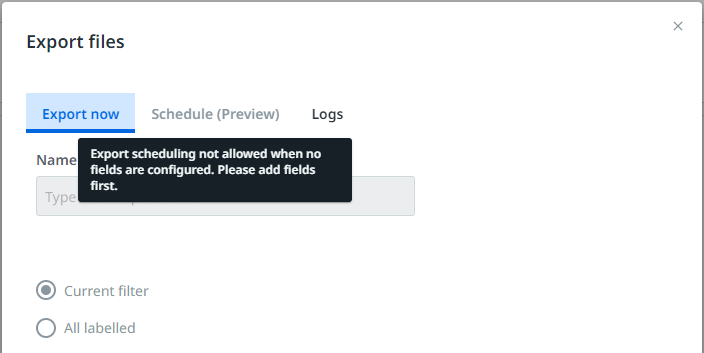
您需要在 AI Center 中创建一个 Document Manager 会话,并配置一定数量的字段,更确切地说,是为了标记高质量的训练和评估数据集。您可以手动定义字段,也可以导入架构。如果未配置字段,则“计划(预览)”选项卡不会启用,并且屏幕上会显示以下消息:
-
您需要训练 ML 模型的几个版本,进行测试,修复可能发生的任何问题,并将其部署到 RPA + AI 自动化。
1. Robot 工作流:机器学习提取程序训练器活动
-
Add the Machine Learning Extractor Trainer activity into your workflow in a Train Extractors Scope and properly configure the scope
-
Make sure the Framework Alias contains the same alias as the Machine Learning Extractor alias in the Data Extraction Scope.
-
Select the Project and the Dataset associated with the Document Manager session that contains your Training and Evaluation datasets. The drop-down menus are prepopulated once you are connected to Orchestrator.
备注:You can set a value for the Output Folder property if you want to export the data locally in the workflow.
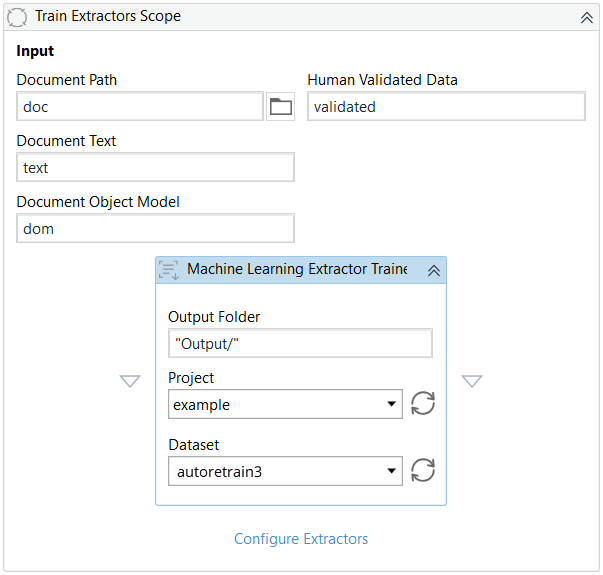
您可以在 AI Center 的“数据标记”视图中的“数据标记”会话名称旁边查看“数据集名称”:

对于选定的数据集,“机器学习提取程序训练器”活动将创建一个微调文件夹,并在其中将导出的文档写入 3 个文件夹中:documents、metadata 和 predictions 文件夹。
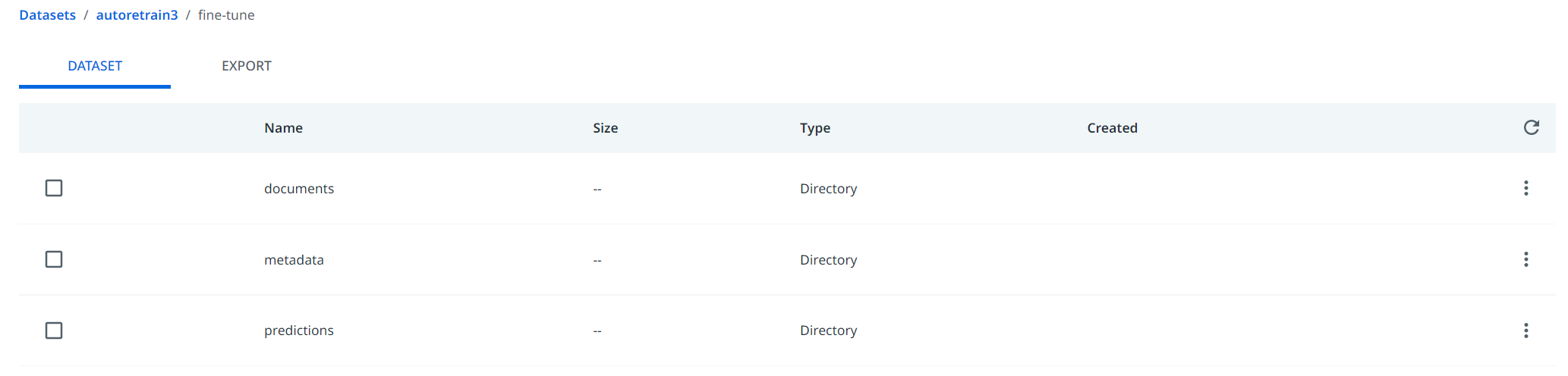
此文件夹专用于将数据自动导入到 Document Manager 中。导入的数据将与以前存在的数据合并,然后合并的数据将以正确的格式导出,以在训练管道或完整管道中使用。导入的数据 automatically 分为两个集合:训练和验证,各占 80% 和 20%。因此,导出的数据将同时包含来自新收集的数据的训练集和验证集。仅当在 Document Manager 中启用了“计划导出”时,才会自动导入数据。
2. Document Manager:计划导出功能
From a Document Manager session, select the Export button  , go to the Schedule (Preview) tab, and enable the Scheduling slider. Then select a start time and a recurrence. When ready, select the Schedule button.
“向后兼容导出”复选框使您能够应用旧版导出行为,即将每个页面导出为单独的文档。如果使用默认方式导出的已训练模型未达到预期效果,请尝试以下方法。取消选中此项以原始多页形式导出文档。
The minimum recurrence is 7 days and the maximum recurrence is 60 days. Given the fact that AI Center training pipelines are mainly configured to run weekly, a recurrence of 7 days is recommended.
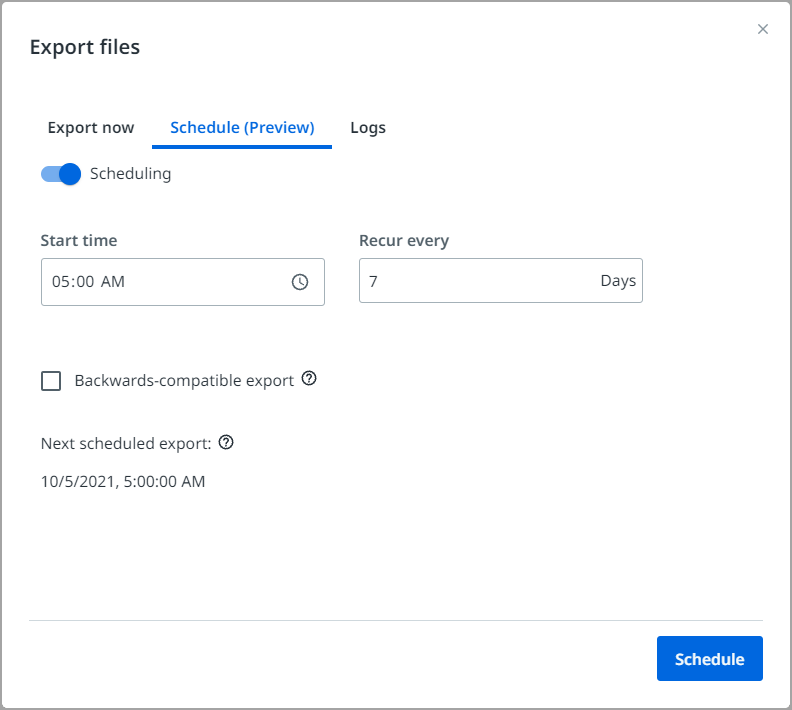
When you set the schedule for export, the imported data from the fine-tune folder is exported to the export folder under auto-export time_stamp.
There is a 2000 page import limit per auto-retrain run.
更具体地说,“计划导出”将步骤 1 中创建的微调文件夹中存在的数据导入,然后将完整的数据集(包括先前存在的数据和新导入的“验证站点”数据)导出到导出文件夹中。因此,随着每个计划的导出,导出的数据集都会变得越来越大。
The file latest.txt is updated or created if this is the first scheduled export. Here you can check the name of the latest export made by Document Manager. Schema export, however, does not update latest.txt. This file is used by the auto-retraining pipeline in AI Center to determine which is the latest export so it can always train on the latest data, so you should never remove or modify it, otherwise, your auto-retraining pipelines will fail.
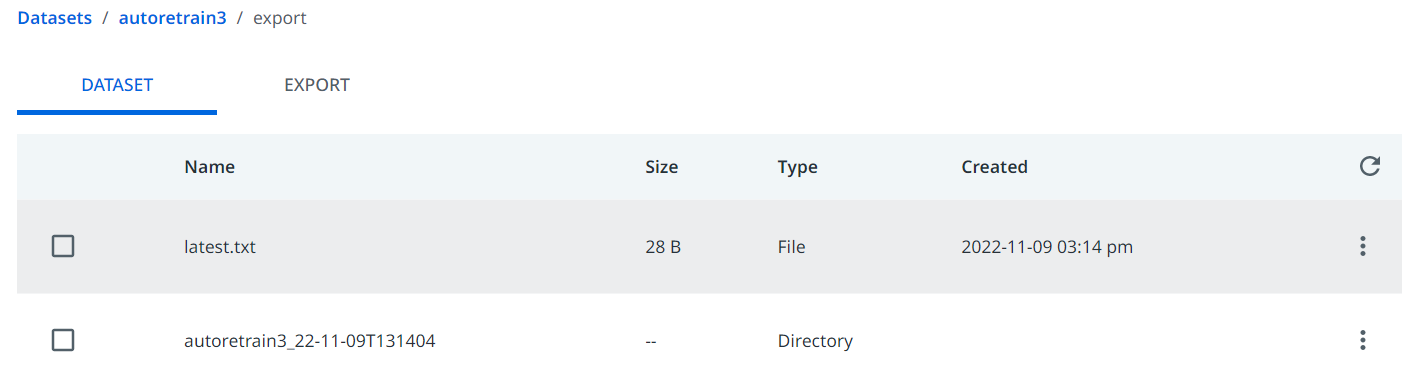
The Scheduled import+export operation might take up to 1-2 hours, depending on how much data was sent from Step 1 during the previous week. We recommend you choose a time when you will not use the Document Manager due to the fact that when an export operation is ongoing no other exports or imports are allowed. However, labeling is always possible.
3. AI Center:计划的自动重训练管道
在 AI Center 中安排训练或完整管道时,需要考虑几个方面。
首先,强烈建议您创建评估数据集,并且只计划完整管道。完整管道同时运行“训练”和“评估”,“评估”管道使用“评估”数据集生成分数。此分数对于决定新版本是否优于旧版本至关重要,并且可以部署以供 Robot 使用。
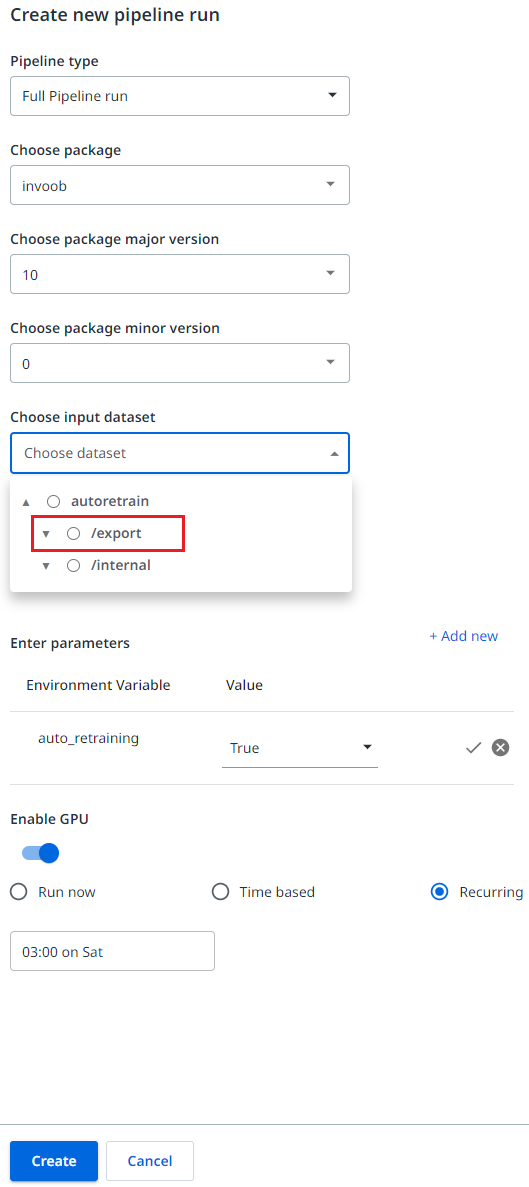
其次,对于完整管道,您需要指定两个数据集:输入数据集和评估数据集。
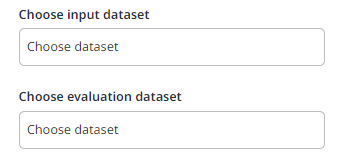
在自动微调循环功能的上下文中,评估数据集没有变化。您仍然需要像往常一样选择一个数据集,其中包含两个文件夹:images 和 latest,以及两个文件:schema.json 和 split.csv。
但是,输入数据集不再是数据集,您需要选择连接到数据标签会话的 AI Center 数据集中的导出文件夹。这样,训练将在数据标签会话的最新导出文件夹上运行,而评估在您指定的同一个评估数据集上运行。
If you do not select the export folder, the auto-retraining does not work.
第三,您需要将“自动重训练”环境变量设置为“True”。
最后,您需要选择“周期性”活动并设置日期和时间,以便有足够的时间从 Document Manager 中完成导出。例如,如果 Document Manager 导出在周六的凌晨 1 点运行,那么管道可能在周六的凌晨 2 或 3 点运行。如果在管道运行时导出未完成,则使用先前的导出,并且可能会对上周训练的相同数据进行再训练。
4.(可选)自动更新 ML 技能
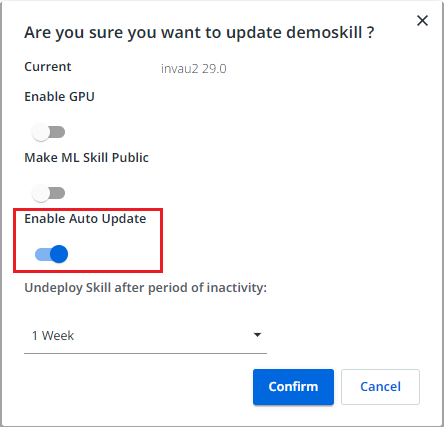
如果您想自动部署由自动计划的训练管道生成的 ML 包的最新版本,您可以启用 ML 技能上的自动更新功能。
The ML Skill is automatically updated regardless of whether the accuracy score improved over the previous training, so please use this feature with care. In some cases, it is possible that the overall score improves even if a specific field might regress a little bit. However, that field might be critical for your business process, so auto-updating and auto-retraining, in general, requires careful monitoring in order to be successful.
自动微调循环已完成。现在,您可以使用来自验证站点的数据自动重新训练 ML 模型。