
- UiPath Assistant
- Configuring UiPath Assistant
- Picture in picture
- Configuring attended automations
- Governance
- Widgets in Assistant
- Apps Widget
- Custom Widgets
- Marketplace Widget
- Automation Store Widget
The Automation Store widget provides users easy access to internal ready-to-go automations available in the Automation Store directly from the UiPath Assistant.
Prerequisites
To use the Automation Store widget, the following conditions must be met:
-
The Assistant must be connected to a tenant that has Automation Store enabled and some automations deployed.
-
UiPath Assistant version 2021.10 or later is installed.
-
A policy is configured in Automation Ops to deploy this widget to your Assistant.
Note:Automation Store is available only with an enterprise license or under an enterprise trial.
Installing an Automation
All automations available in the Automation Store can be found on the UiPath Assistant homepage, in the Automation Store section. To add an automation to your list of processes, select the automation and click Install.
Field Descriptions for Automations
Selecting an automation displays additional information about it, as described in the following table.
| Field | Description |
|---|---|
| Title | The title of the automation. Clicking the title takes you to the Automation Store webpage for the specific automation. |
| Category | Displays the category of the automation (e.g. HR, Finance, IT). |
| Description | Description of the automation provided by the author. |
| Rating | The average rating of the automation based on user feedback. |
| Reviews | The total number of reviews. |
| Author | The name of the person who built the automation. |
| Number of downloads | How many people downloaded the automation. |
| Avg savings a month | How many hours, on average, the automation saves the business user. |
| Media | Media provided by the author for the automation, if available. |
| Applications | What applications are used in the automation (e.g. Excel, Outlook). |
| Send a review or question | Click this link to go to the Automation Store webpage where you can add a review or a question about the automation. |
Updating an Installed Automation
If an update is available for a process added from the Automation Store, an Update tab is displayed when you select the automation in your list of processes. Select the Update tab and then click the Update button to get the latest version.
Sharing an Idea in Automation Hub
If you know of a repetitive task or a process that could be automated, you can easily go to Automation Hub and share your idea directly from the Assistant. On the Assistant homepage, select the menu  next to Home, and then select Submit an idea.
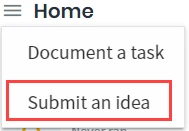
This opens a questionnaire in Automation Hub that enables you to add details about your automation idea and submit it for review.
You can enable or disable the "Automation Hub: Submit an Idea" menu from the Launchpad section in the Preferences menu in the UiPath Assistant.
Deploying the Automation Store Widget
Just like for any other widget, the Automation Store Widget deployment is handled through Automation Ops policies.