
- Overview
- Introduction
- Key concepts
- Installation and setup
- Getting started
- Trust and compliance
- Governance
- Features
- Reference
- Troubleshooting
- Backup and restore
Introduction
What Cartographer does, how it works, and how it fits your organization's controls and models.
UiPath Cartographer is an AI agent for business analysts that turns process knowledge into governed process documentation. You provide what you already have — transcripts, interviews, SOPs, recordings, or existing automations — and Cartographer documents the process as it runs today, designs an improved future state, and generates a Process Design Document (PDD) and, once approved, a Specification Design Document (SDD) that development teams and coding agents can build from.
Unlike a typical general-purpose desktop assistant, Cartographer runs under the controls your UiPath organization already has and operates the enterprise systems your work actually happens in.
Cartographer installs alongside UiPath Assistant and Delegate, and what experience you see depends on what your admin has enabled.
This guide is written for business analysts, or anyone performing that function on a team, who need to collect available information, coordinate key design decisions, gain approvals, and move from a PDD to an SDD.
What you can do with Cartographer
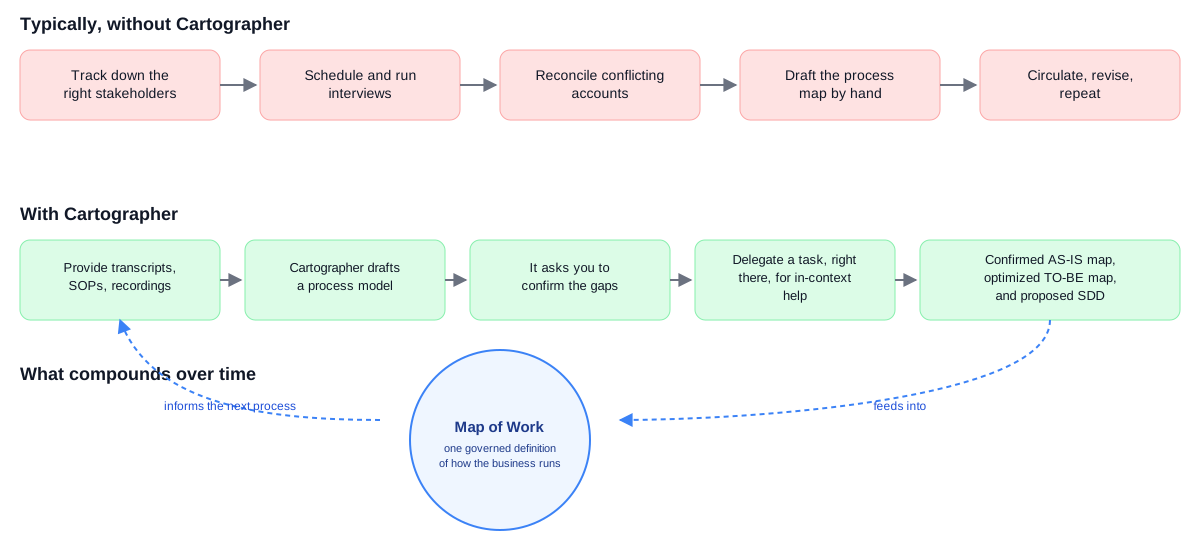
Cartographer is your discovery partner for turning process knowledge into build-ready blueprints. Its long-term goal is the Map of Work: a single, versioned, governed definition of how the business runs, so specifications, sign-off, and audit come from one source of truth instead of drifting documents.
Documenting a process usually means chasing down the people who know it, running interviews, and reconciling accounts that disagree with each other — all before you can even start drafting. Cartographer takes on that legwork directly:
Document a process as it runs today
You can provide what you already have — transcripts, interviews, SOPs, recordings — and Cartographer builds a confirmed AS-IS process map, extracting business rules and identifying gaps along the way. This capability is powered by a set of preset, predefined skills and doesn't require additional applications; the underlying Documentation skill is further augmented with process-specific knowledge across 100+ well-researched articles in the process atlas. See Providing documents to Cartographer.
Design an improved future state
Once the current state is confirmed, you assign an automation mode to each step, taking into account business goals, pain points, and the desired use of agents — Cartographer drafts a future-state process map, color-coded by mode. See TO-BE design and PDD generation.
Generate a build-ready specification
Cartographer combines the confirmed AS-IS and TO-BE states into a downloadable Process Design Document (PDD) for process redesign or automation projects. Once the PDD is approved, it generates a Solution Design Document (SDD) that development teams and coding agents use to build the automation. See Generating an SDD.
Reuse what you already have
You can point Cartographer at automations already published in your tenant instead of starting from a blank process, and it designs around what already works, replacing only the manual glue between them. See Working with existing automations.
Bring in a teammate for a hands-on step
Cartographer can delegate a step to Delegate for in-context help, and incorporate the reply back into the process. See Delegating a task.
How Cartographer works
A business process tracks its own progress through a series of stages, visible in the Progress section of the sidebar:
| Stage | What happens |
|---|---|
| Discovery | You describe the process, or provide source material for it. |
| Define as-is | Cartographer builds a process model, extracts business rules, identifies gaps, and confirms a current-state process map. |
| Design to-be | You assign an automation mode to each step. Cartographer drafts a future-state map. |
| Validate to-be | You review and confirm the future-state design before the detailed documentation is written. |
| Architect process | Cartographer combines both states into a formatted, downloadable PDD. |
| Architect solution | From the approved PDD, Cartographer generates an SDD ready for development teams and coding agents. |
| Handoff | You publish the SDD and PDD to Automation Hub for the build team. |
What you produce
- A confirmed AS-IS process map, as an embedded flowchart
- A confirmed TO-BE process map, color-coded by automation mode
- A delivery model showing each step's current and future handling
- A downloadable PDD as a
.docxfile - A downloadable SDD as a Markdown file, ready for coding agents
What makes Cartographer different
It works from what you already have
Cartographer works from transcripts, interviews, SOPs, and recordings — see Providing documents to Cartographer — and from existing automations you point it at, reusing what already works instead of rebuilding it — see Working with existing automations. When a step needs hands-on help, it can delegate that step to Delegate for in-context assistance — see Delegating a task.
It runs inside your organization's controls
Cartographer acts with your access, on your machine, inside your systems. There is no separate governance layer built just for it — it operates under the same automation platform governance your organization already runs everything else through, configured through Automation Ops.
Your administrator controls which applications and tools it can use, which models it runs on, and which systems it can connect to, using the same central policies that govern the rest of your UiPath estate. Independently of that, you control how much it does before checking with you, within whatever your organization allows. Model calls route through the UiPath AI Trust Layer, so Cartographer is covered by the same platform controls as everything else rather than needing a separate review. See Security overview and Local security configuration.
It isn't tied to one model
Cartographer is not built around a single model from a single vendor. By default, it uses whatever models your organization has made available through the UiPath AI Trust Layer — either UiPath's default models, or your own configuration if your organization brings its own.
Your organization can decide which models are acceptable and supply its own where a contract, a regulator, or a data residency requirement demands it. Whichever model is used, calls route through the AI Trust Layer, so the controls and the audit trail do not change. See Choosing the LLM model for Cartographer's model recommendations.
Model choice matters. The LLM model you select affects how well Cartographer performs. If you're on a different model than recommended, Cartographer shows a Model not recommended banner — a quality heads-up, not an error. See Available models to change it.
It builds on what you already have
If your organization already runs UiPath, Cartographer uses that work rather than duplicating it. It can start from the automations already published in your tenant instead of a blank process — see Working with existing automations. Your queues, assets, and permissions carry over, so there is no second set of entitlements to maintain.
Extend Cartographer
Connectors reach into your existing systems the same way the rest of the UiPath platform does; Skills and Plugins are ways of adding capabilities.
| Connectors | Connect Cartographer to your tools and data sources through Integration Service connectors, MCP servers, or MCP Apps. See Working with external data and applications. |
| Skills | Teach Cartographer reusable capabilities for specific applications or tasks, installed from a feed or created by your organization. See Sharing skills with your team. |
| Plugins | Bundle a set of skills into a distributable package. See Extending functionality with plugins. |
Responsible use of Cartographer
Cartographer is powered by large language models, and its plans, explanations, and the content it produces may occasionally be inaccurate, incomplete, or based on a misunderstanding of your request. This is a known limitation of LLMs, sometimes called "hallucination."
For example:
- Cartographer may misinterpret an instruction and take an action you did not intend.
- It may extract or summarize data incorrectly from a document or business system.
- Its explanation of what it did, or why, may sound plausible without matching what actually happened.
Always review the plan and output before relying on it, especially for production workflows, data handling, or actions that are hard to undo:
- Check proposed actions before confirming them, particularly anything that changes data or reaches into a business system.
- Review deliverables (PDDs, SDDs) before sending them on or acting further on them.
Cartographer works best as a collaborator, not an unsupervised decision-maker. Your review and judgment remain essential, particularly for workflows that touch production systems or external stakeholders.
Next steps
Continue through the documentation in order, or jump to the section that matches your current need:
- Key concepts — Business processes, business tasks, AS-IS/TO-BE, PDD, and SDD
- Your first Cartographer tasks — Prepare for your first session
- Installation — Install Cartographer and check prerequisites
- Security overview — What Cartographer can reach, before you install
- Local security configuration — How that access is controlled
- What you can do with Cartographer
- Document a process as it runs today
- Design an improved future state
- Generate a build-ready specification
- Reuse what you already have
- Bring in a teammate for a hands-on step
- How Cartographer works
- What you produce
- What makes Cartographer different
- It works from what you already have
- It runs inside your organization's controls
- It isn't tied to one model
- It builds on what you already have
- Extend Cartographer
- Responsible use of Cartographer
- Next steps